
AI Agents
Inspect recognized crawler user agents in Cloudflare analytics or preview a local server log.
View as MarkdownAI Agents shows requests identified by user-agent text. Use it to investigate crawler activity, not to measure human visitors, citations, or whether an AI company trained on your pages. For attributed website sessions, use Traffic Analytics.
Connect the project
Open AI Visibility → AI Agents. The page heading is Agent Analytics. The connection workflow has three stages: 1. Connect Cloudflare, 2. Select zone, and 3. Analytics. A workspace administrator needs a token with access to the intended Cloudflare zone. Follow Connect Cloudflare for permissions and setup.
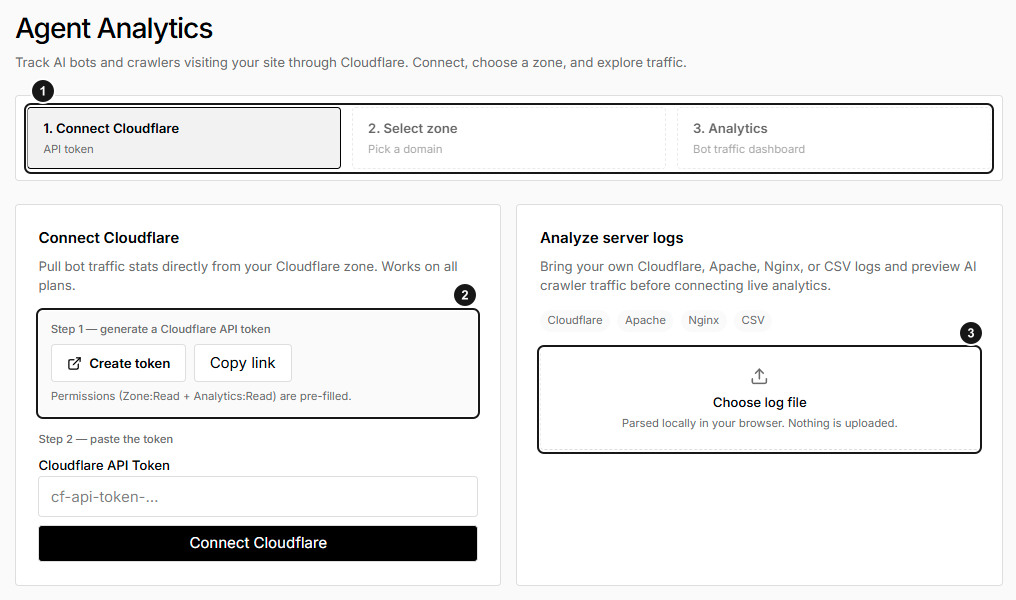
EarlySEO's unconfigured connection screen, with an empty token field. 1. Connection, zone selection and analytics. 2. Create a limited Cloudflare API token. 3. Optional local log preview. No connected-zone request data is shown; this is not evidence of zero crawler activity.
Read the analytics
- Confirm the Connection and Zone before interpreting results.
- Select 7D, 30D, or 90D. The default is 7D.
- Check Data and Updated for availability and freshness.
- Compare Total vs AI requests, then use the bot chips in Bot request trends to show or hide individual lines. Up to six bot series are offered in that chart.
- Review Bots in view for counts by recognized bot family.
| Card | Interpretation |
|---|---|
| Total requests | All requests returned for the zone and period, not only bot requests. |
| AI bot requests | Requests in returned user-agent groups that match the recognized bot catalog. |
| Bots seen | Number of recognized bot families with matching activity, not the number of unique full user-agent strings. |
| Companies seen | Companies mapped from those recognized families. |
The live catalog includes GPTBot, ChatGPT-User, OAI-SearchBot, ClaudeBot, Claude-SearchBot, PerplexityBot, Perplexity-User, Googlebot, GoogleOther, Applebot, Bingbot, and Meta-ExternalAgent. Some are general search crawlers. The AI bot requests label is therefore broader than exclusively AI-assistant traffic.
Understand scope and freshness
Cloudflare analytics is requested in daily, trailing 24-hour windows with UTC date labels. User-agent analysis uses up to the top 200 returned groups per window, so smaller groups can be absent. Matching a user-agent name is not authenticated proof of the caller's identity.
Analytics can be cached for 30 minutes. Sync requests updated connection and analytics data; a failed sync can leave older results visible. Check the status, update time, and any error before relying on the chart.
Preview a local log
On the connection screen, Analyze server logs provides a separate local preview:
- Select Choose log file and choose a
.csv,.log, or.txtfile no larger than 8 MiB. - Read the line count, AI crawler hits, Bots detected, and top matched bots.
- Use the preview to decide whether a fuller investigation of your server logs is needed.
The file is processed in your browser and is not uploaded or saved as a Cloudflare integration. The preview searches nonempty lines for bot-name patterns; it does not parse timestamps, validate a log format, or apply the dashboard's date range. One line can match multiple bot families. Its recognition list differs from the live Cloudflare catalog, so the two totals need not agree.
Resolve missing data
- No zones: confirm token permissions and zone scope, then use Sync now on the zone-selection screen.
- Request error: inspect the displayed Cloudflare error and reconnect or sync with an authorized token.
- No requests: verify the selected zone and range. An empty successful result differs from a failed request.
- Total requests but no AI bot trends: no recognized returned user-agent groups matched; this is not proof that no crawlers visited.
Disconnect removes EqualAI's stored connection credential, not the token at Cloudflare. See connection lifecycle.