
Responses
Read captured AI answers and distinguish brand mentions, citations, and provider evidence.
View as MarkdownOpen Responses to inspect the answers behind your metrics. Confirm the selected project before comparing results.
Find an answer
- Set the date range and use search or All filters.
- Choose All, Mentions you, or Competitors only to narrow the answer list.
- Use the topic and prompt rail to focus on one group of questions.
- Open an answer and inspect its model, capture date, country, language, sentiment, and mention/citation indicators.
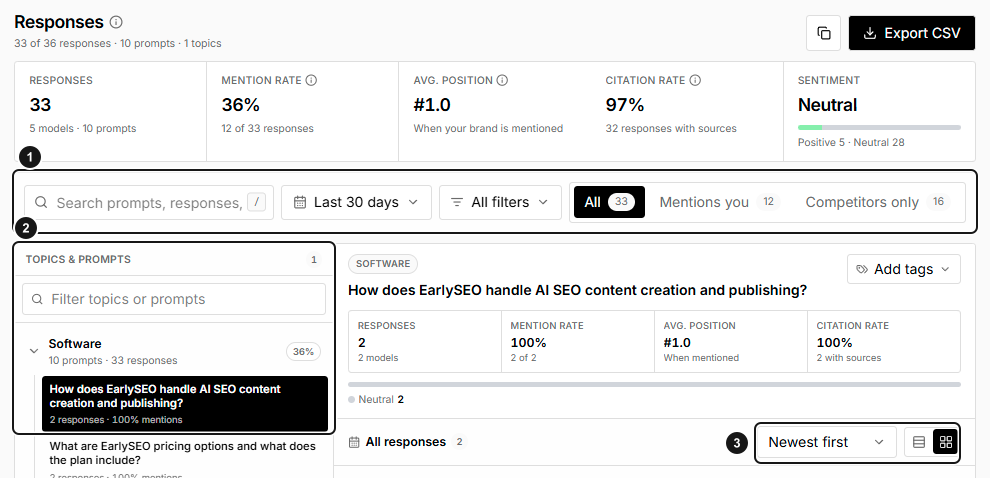
EarlySEO example snapshot. 1. Response filters and mention views. 2. Choose a topic or prompt. 3. Sort and change the response view. The displayed scope and counts are an example; open an answer to review its evidence.
Export CSV provides answer-level fields, including the prompt, model, sentiment, mention and citation evidence, and capture information. Treat exported answers as potentially sensitive business information.
Understand the summary
- Responses counts answers in scope.
- Mention rate is the percentage naming your brand.
- Avg. position summarizes valid recorded mention positions; missing positions should not be read as rank zero.
- Citation rate is the percentage of answers containing at least one source citation, regardless of who owns that source.
- Sentiment summarizes the tone classifications in the selected answers.
The citation definition here differs from Overview, where citation rate refers to your project domain. An answer can cite a competitor or independent publication without citing your website.
Read the evidence
Use What the user saw or Open when offered to inspect the captured presentation. Other controls include Copy, Link, and Why this result.
| Evidence | How to interpret it |
|---|---|
| Brands named | Brands detected in the answer, not necessarily linked sources |
| Sources cited | Sources associated with citations in the captured answer |
| Quoted in the answer | Available evidence that content appeared in the answer |
| Named by the model | Available model-provided source or name evidence |
| Read, not cited | A source encountered during retrieval without a corresponding answer citation |
| Query fanouts | Captured background searches used while answering |
Evidence availability varies by model and provider. No fanout or read/not-cited record does not prove the provider performed no retrieval. Read the answer itself before concluding that an automated classification is correct.
Troubleshooting
- The list is empty: clear search, tab, topic, and other filters; confirm a run completed in the selected period.
- A source is present but your brand is not mentioned: citations and mentions are independent signals.
- Evidence controls are absent: the provider may not have supplied that evidence.
- A link opens without matching your current view: check project access and the destination's filters.