
AI Model Insights
Compare mention, citation, sentiment, visibility, and answer availability across AI models.
View as MarkdownOpen Reports → AI Model Insights for model-level comparisons. Use the same project and comparable response scope before concluding that one model performs better than another.
Choose a report tab
| Tab | Use it to investigate |
|---|---|
| Mention Rate | How often answers name each tracked brand |
| Citation Rate | How often answers cite each brand's domain |
| Net Sentiment Score | The tone scores associated with captured responses |
| AI Visibility Score | Rank-weighted brand visibility, including zero contributions |
| Position Distribution | Where brands appear in recorded mention positions |
| Date Comparison | Differences between two selected dates |
| AI Overview Results | Whether captured Google AI Overview queries returned overview results |
Set the date range and All filters, then select competitors where that control is offered. Filters and brand controls are not interchangeable across tabs. Date Comparison has its own date selections; inspect those even when the shared date control looks correct.
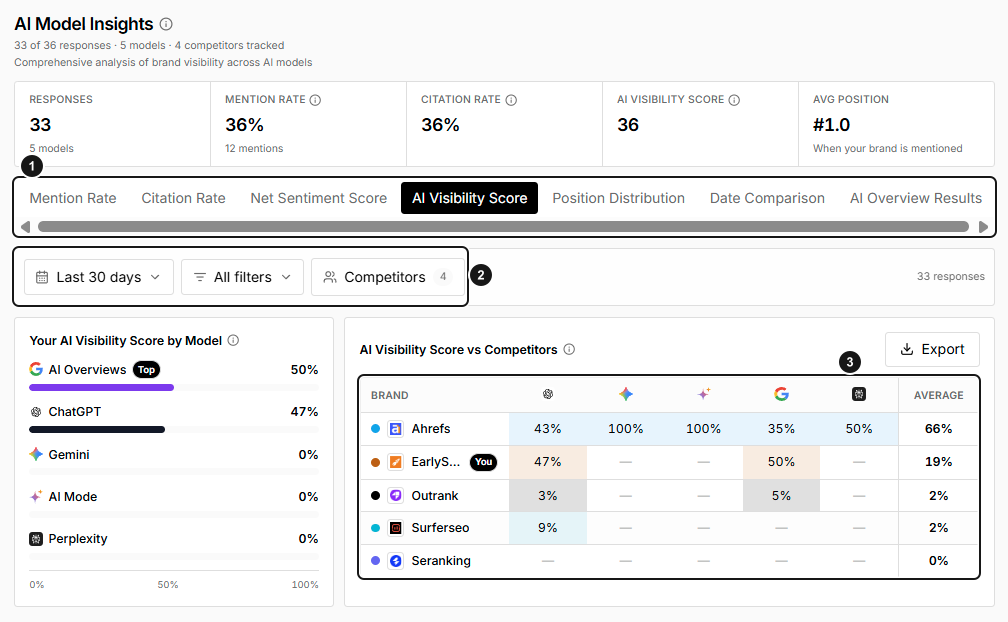
EarlySEO example snapshot. 1. Choose the metric. 2. Keep filters and competitors consistent. 3. Compare the same metric across brands and models. These values illustrate the report layout, not expected performance.
Read shares and rates correctly
Your Mention Share by Model distributes your mentioning answers across models. It is not the same as each model's mention rate, which divides by that model's answer count.
Your Citation Share by Model distributes responses citing your domain across models. The citation-rate matrix checks each row brand's domain; it does not count every unrelated citation as a brand citation.
AI Visibility Score uses reciprocal-rank contributions: 100 at rank 1, 50 at rank 2, 33 at rank 3, and zero for absent brands or invalid/missing ranks. The average includes all answers in the model's scope.
Matrix averages give each model column equal weight. A model with few answers can therefore affect the average as much as one with many answers.
Interpret sentiment carefully
The own-brand model summary averages the captured response sentiment across answers. The competitor matrix averages that same response sentiment over answers mentioning each brand. It does not independently analyze the tone directed at each competitor. Use Reputation and original Responses when brand-specific evidence matters.
Investigate date and overview differences
In Date Comparison, choose the two dates and brand, then review What changed and Changes By. Keep the other filters consistent.
AI Overview Results measures result availability among captured overview queries, not your brand's mention rate. Time buckets with no queries are skipped rather than counted as failed overviews.
Use the tab's Export control when available to retain the displayed comparison.
Troubleshooting
- A model column is zero or sparse: check answer counts, filters, and available ranks.
- The default period seems old: this report can anchor presets to the latest tracked day rather than today.
- A share is high but a rate is low: share depends on volume across models; rate uses the model's own denominator.
- Sentiment differs from another report: verify mention-only versus all-response aggregation.