
Traffic Analytics
Explore GA4 traffic attributed to recognized AI-related session sources, compare landing pages, and copy results.
View as MarkdownTraffic Analytics measures visits to your website recorded in Google Analytics 4 (GA4). It answers a different question from prompt tracking: which recognized AI-related sources sent measurable traffic, rather than which models mentioned your brand.
Before you begin
Open AI Visibility → Traffic Analytics in the correct project. The page heading is AI Traffic Analytics. A workspace administrator must connect a Google account and choose that project's GA4 property. Follow Connect Google Analytics if you see Connect Analytics or Select Property instead of charts.
GA4 must already collect data for the website. A working connection does not guarantee that GA4 has recorded AI referrals.
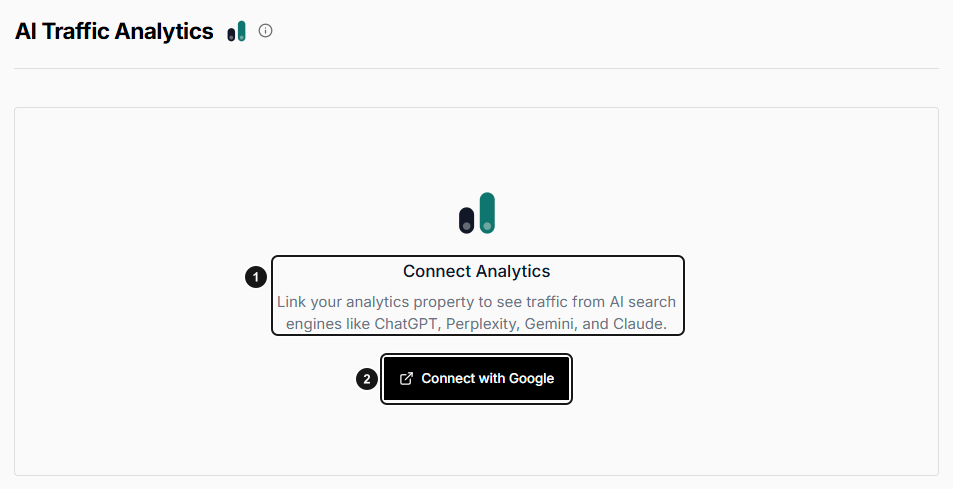
EarlySEO before Google Analytics is connected. 1. Connect Analytics setup state. 2. Start Google Analytics connection. If you see this screen, follow the connection guide before looking for the dashboard controls below; it is not a zero-traffic result.
Read the dashboard
- Choose Last 7 days, Last 30 days, or Last 90 days under Date range. The default is 30 days.
- Leave Source on All Sources, or select a returned source to narrow the report.
- Choose Sessions, Users, Conversions, or Conv. Rate for the chart. Use Day, Week, or Month to change its grouping.
- Compare Top AI Sources Table with Top Landing Pages to identify sources and entry pages worth investigating.
| Metric | Meaning |
|---|---|
| AI Sessions | GA4 sessions attributed to the matching session sources. |
| AI Users | GA4 user counts returned for those sources. Sums across source rows or daily buckets are not a deduplicated count of people across the whole period. |
| Conversions | The GA4 conversions metric for the matching traffic. It can contain multiple conversions per session. |
| Conversion Rate | Conversions divided by sessions, multiplied by 100. Zero sessions produces 0%; this is not a percentage of uniquely converting people. |
| Share | A source's session share, even when another chart metric is selected. |
Conversion Settings opens Project Settings. The report currently uses GA4's conversions metric; selecting event names there does not filter this report to those events.
What counts as AI traffic?
EqualAI matches GA4 session-source text against recognized names, including ChatGPT/OpenAI, Perplexity, Gemini/Bard, Claude/Anthropic, Copilot, You.com, and Phind. This is attribution by source name, not a record of every visit influenced by AI. Visits with missing referrers or different source labels may not appear. Matching a source also does not establish a citation, model training, or crawler visit.
The source request returns up to 50 source/medium rows. Landing-page data returns up to 25 rows. These bounded reports are not an unlimited export of your GA4 property.
Review and copy landing pages
Use Sessions, Users, or Path to sort Top Landing Pages, then move through its 10-row pages. Export copies CSV to your clipboard; it does not download a file. Paste it into a spreadsheet or text editor. The CSV contains the returned landing-page rows in the current sort order, not just the visible page, with landing page, sessions, and users.
Annotations shows available project annotations alongside the chart; it does not change the measurements.
Freshness and troubleshooting
- Data through identifies the latest date in the returned series. Its age describes this report's data, not a guaranteed GA4 processing delay.
- Reports can be reused from a four-hour cache for the same property, range, and source. Reloading is not a guaranteed live refresh.
- For an empty chart, verify the property and selected source, try a wider range, and check whether GA4 itself has matching source traffic. Do not interpret missing attribution as proof that no AI-influenced visits occurred.
- For permission or connection errors, ask an administrator to reconnect with an account that can access the property.
- Use Change property to select another accessible property. Subsequent reports use that property; this does not merge properties.
- Disconnect stops this project's GA4 connection. See disconnect consequences before using it.
For crawler requests rather than human sessions, use AI Agents.